Visual CPQ Configuration
Configure Price Quote Tools: A Buyer's Guide for 2027
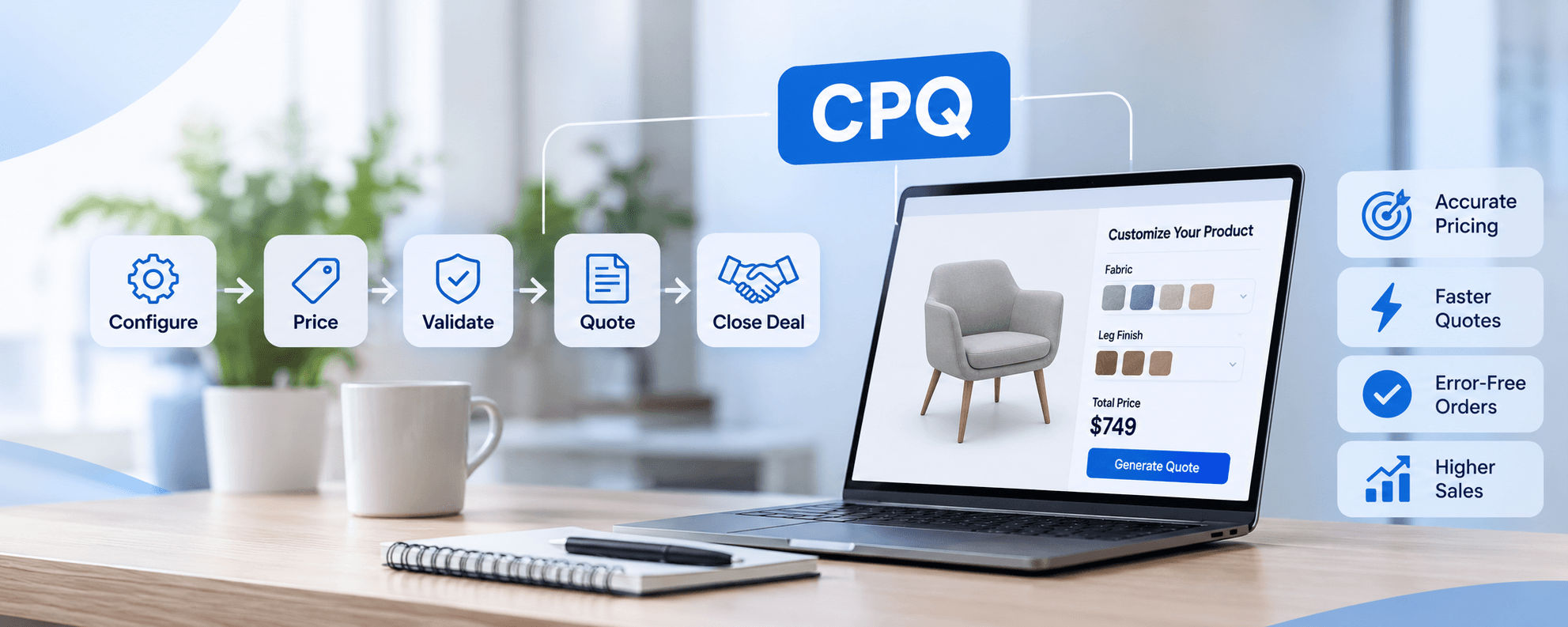
Sales teams at manufacturers, B2B distributors, and multi-channel retailers are spending too much time building quotes and not enough time closing deals. Configure price quote tools exist precisely to fix that: they eliminate pricing errors, stop misconfigured orders from reaching production, and cut the approval delays that let competitors move faster. These aren't process discipline problems; they're symptoms of quoting infrastructure that wasn't built for the complexity these businesses now operate at.
The market for configure price quote tools has splintered into three very different tiers: legacy enterprise suites built for static catalogs and text-based forms, modern composable platforms designed to slot into existing CRM stacks without full migrations, and a newer generation of visualization-first tools that most buyers don't even know to look for. Choosing the wrong tier means either overpaying for capability you won't use or underbuying for a product complexity your tool can't handle. The right platform addresses pricing consistency, real-time validation, approval automation, and quote-to-order handoffs, though the specific scope depends on your product complexity, integrations, and change management readiness.
This guide covers 12 configure price quote tools, breaks down their pricing models, integration approaches, implementation realities, and total cost of ownership, and explains the one capability that now separates next-generation platforms from everything else in the market. By the end, you'll have a shortlist framework, a realistic budget range, and a structured process for running vendor demos that actually test your scenarios.
What configure price quote tools actually do
CPQ software handles the workflow between a buyer expressing interest in a configurable product and a signed, production-ready order landing with the right team. Each step in that workflow has its own failure mode when it's managed manually, and understanding the end-to-end process is what lets you evaluate whether a platform covers your actual problem or just part of it.
The CPQ workflow from configuration to signed quote
The process starts when a rep or buyer selects and customizes a product. A rules engine validates the configuration in real time, catching incompatible combinations before they move forward. Pricing logic then applies: list prices, discount rules, margin controls, and approval thresholds all execute before the quote document is generated. That document goes out branded, accurate, and ready for e-signature. Once accepted, the approved configuration and pricing flow downstream to order management and billing without anyone rekeying data.
Each handoff is where manual processes break down. Configuration choices get transcribed incorrectly. Pricing spreadsheets don't reflect the latest discount policies. Approvals sit in someone's inbox. The quote document uses an old template. The order that reaches production doesn't match what the customer saw. CPQ software closes each of those gaps by connecting the steps into a single governed workflow.
Why spreadsheets and manual quoting fail at scale
The failure modes of manual quoting aren't dramatic; they're slow and expensive. Pricing inconsistencies between reps, configuration errors that don't surface until production, approval bottlenecks that add days to turnaround, and the invisible cost of rep time spent on administrative work rather than selling all add up to real revenue loss. Structured CPQ deployments routinely cut quote turnaround time by 50 to 75 percent and reduce configuration errors by up to 80 percent, based on figures cited across implementation partner reporting and industry benchmarks from sources including Aberdeen Group. Translate those numbers into rep capacity and rework cost, and the business case builds quickly.
The deeper problem is that spreadsheet-based quoting doesn't scale with product complexity. When a business has 12 SKUs, a shared pricing spreadsheet works fine. When it has 1,200 configurable variants with interdependent options, regional pricing, volume discounts, and multi-tier approval rules, every quote becomes a potential error. That's not a people problem; it's a tooling problem.
Where CPQ fits in the broader quote-to-cash stack
CPQ is a connector, not an island. Upstream, the CRM feeds it opportunity data: account context, deal stage, customer-specific pricing, and prior purchase history. ERP feeds it inventory, cost data, and production constraints. Downstream, CPQ's output feeds billing, contract lifecycle management, and order management. The quality of those connections determines whether CPQ reduces administrative work across the organization or just creates a new system that reps have to maintain alongside the old ones.
Before evaluating any platform, buyers need to map these upstream and downstream connections explicitly. A CPQ tool that integrates natively with your CRM but requires middleware to talk to your ERP is a different implementation than one that covers both natively. That distinction affects timeline, budget, and ongoing maintenance cost more than almost any other variable in the evaluation.
How legacy CPQ and modern platforms differ
The CPQ market has split into clearly different tiers, legacy enterprise suites, modern composable platforms, and visualization-first tools, and which tier you're buying from determines not just features but implementation effort, flexibility, and long-term fit. Understanding the split is market orientation that every evaluation needs before vendor conversations begin.
What legacy CPQ tools got right (and where they stalled)
Enterprise-era CPQ tools solved real problems. They brought structure to complex product catalogs and approval chains at a time when most organizations were managing both through email and spreadsheets. Oracle CPQ and early versions of Salesforce CPQ gave sales operations teams a governed, auditable quoting process for the first time. That was genuinely valuable, and for organizations deeply embedded in those ecosystems, it remains valuable.
The limitation is architectural. These platforms were built for flat, text-based quoting in a browser. They weren't designed for self-service buyers, composable deployment architectures, or the visual product configuration that modern configurable-product selling now requires. Extending them for those use cases typically means significant custom development, which means cost, fragility, and upgrade risk.
The shift toward composable, API-first architectures
Modern quoting platforms like DealHub and Logik.io are built to slot into existing CRM stacks rather than require platform migrations. API-first means faster integrations, more flexible deployment, and the ability to add capabilities like guided selling or dynamic pricing without rebuilding adjacent systems. A composable CPQ tool handles the quoting workflow without requiring the organization to standardize the entire revenue stack around the same vendor.
This matters most for organizations that have already invested in a CRM they're happy with but need a better quoting layer on top of it. The API-first tier gives them that without forcing a migration. It also tends to reduce implementation timelines significantly, which affects both project cost and time to realized ROI.
Why the product configurator is now the competitive differentiator
As products become more complex and buyers expect self-service experiences, the configurator layer is where CPQ platforms diverge most sharply. Some tools still treat the configurator as a rules form: a structured list of options with dependency logic that validates selections. Leading platforms treat the configurator as an interactive experience that reduces errors and accelerates buyer decisions before a quote is even generated.
The configurator gap has become the most consequential feature difference in a CPQ evaluation for any organization selling configurable products. A rules form is adequate for selecting a software subscription tier. It falls short for a manufacturer selling industrial equipment with hundreds of component combinations, or a furniture retailer whose buyers need to see material and finish changes reflected in real time before committing to a configuration.
The 8 core features every CPQ evaluation should cover
Running a structured CPQ evaluation requires a consistent framework across vendors. These eight areas cover the capabilities that separate production-grade configure price quote tools from tools that work in demos but struggle in deployment. Use them as the basis for a weighted scorecard.
Product configurator and rules engine
A production-grade configurator must handle complex bundles, nested accessories, variant combinations, dependency and exclusion rules, and real-time validation that prevents invalid configurations from moving forward. The rules engine should be maintainable by business users, not developers, with version control, rollback capability, and audit history. Evaluate whether the tool can model your actual product catalog, including engineer-to-order products, optional accessories, and regionally specific variants, before any pricing logic runs.
The practical test is straightforward: take your most complex product configuration and run it through the vendor's demo environment. If it requires workarounds in the demo, for example, the rep manually overriding dependency rules or simulating configuration steps outside the tool, those workarounds will follow you into production. The rules engine should catch configuration errors before pricing runs, not after.
Guided selling and pricing management
Guided selling is how CPQ helps reps identify the right solution rather than just presenting a product catalog. Question-based recommendation flows, role-specific selling experiences, and support for self-service portals determine whether the tool accelerates decisions or just digitizes confusion. The strongest implementations guide sellers toward valid, commercially attractive configurations rather than leaving them to navigate a catalog independently.
Pricing management is the area with the highest margin impact. Compare support for multiple price books, volume and subscription pricing, discount governance, margin controls, and approval thresholds. A platform that lets reps apply discounts freely without margin visibility or approval enforcement generates quotes but doesn't protect revenue. These two features together determine whether sellers quote faster and smarter, or just faster.
Quote generation, contract management, and workflow approvals
Quote documents should generate automatically from approved configurations with branded templates, conditional clauses, multi-currency support, e-signature, and clean handoff to order management without rekeying. Contract management extends this downstream: clause libraries, redlining, renewal tracking, and amendment handling determine whether the CPQ platform manages the commercial relationship over time or stops at the signed document.
Approval workflows need to support sequential and parallel routing, thresholds based on discount level, margin, deal size, or geography, and delegation rules for when approvers are unavailable. These governance controls are what separate a quoting tool from a CPQ system with real process integrity.
Analytics, administration, and scalability
Good CPQ reporting covers quote-to-order conversion, approval cycle time, configuration error rates, discount leakage, and deal-size trends. These aren't vanity metrics; they're the data that tells sales operations where the quoting process is losing revenue and where it's working. Without this visibility, CPQ becomes a black box rather than a managed workflow.
Administration matters for long-term TCO. How quickly can a business user update a product, pricing rule, or template without opening a developer ticket? Platforms that require IT involvement for catalog changes create a maintenance bottleneck that grows more expensive as the business evolves. Scalability across growing catalogs, multiple currencies, and multi-entity deployments is the final checkpoint before finalizing a shortlist.
The feature most CPQ stacks still miss: 3D product visualization
Most CPQ platforms handle the commercial side of configuration reasonably well. The gap that drives the largest operational problems for manufacturers and configurable-product retailers sits on the other side of the workflow: what the buyer and rep actually see when they're making configuration choices.
Why static product catalogs fail configurable products
When a manufacturer sells industrial equipment with hundreds of configuration options, a text-based product form creates two compounding problems. Buyers can't visualize what they're ordering, which means they make assumptions that don't match production reality. Reps can't catch spatial or structural errors before they reach engineering, which means change orders, rework, and delays. Static images don't show variant combinations. PDFs don't update dynamically. This is where configuration errors originate.
The same problem applies in furniture, consumer electronics, automotive components, and any product category where the physical appearance or spatial relationship between components matters to the buyer's decision. A configuration form that validates technically correct selections still leaves the buyer uncertain about whether what they've chosen is what they actually want. That uncertainty creates revision cycles, order changes, and returns.
How 3D visualization changes CPQ outcomes
Real-time 3D product configuration lets buyers interact with a product as they customize it, seeing material changes, component additions, and structural variations before a quote is generated. The effect is compounding: visual confirmation reduces order errors because buyers verify their choices directly rather than inferring them from text descriptions, engineering reviews shorten because spatial problems surface before documents are finalized, and buyers arrive at decisions faster when they can see what they're committing to.
Deployments with real-time visual configuration have documented up to an 80 percent reduction in configuration errors, faster quote-to-cash cycles, and measurable improvements in deal size where guided visual selling is implemented consistently. The mechanism is straightforward: confident buyers decide faster, and accurate orders don't require rework. Both improve the economics of every deal in the pipeline.
HexaCoder: where CPQ meets real-time 3D configuration
HexaCoder is built for manufacturers and retailers whose configure-price-quote requirements extend beyond commercial workflows into spatial product complexity. The platform combines a real-time 3D product configurator with digital twin technology in a single enterprise system, purpose-built for high-SKU, configurable product lines where visual accuracy at the point of configuration matters as much as pricing governance.
The operational distinction is significant. The visual output in HexaCoder connects customer configuration choices to production-ready specifications downstream, which means the configuration a customer confirms visually is the same configuration that reaches the production floor. For organizations dealing with costly custom-order errors and extended engineering review cycles, this is a capability that legacy CPQ and most modern composable platforms don't offer natively. For evaluations involving configurable products with spatial complexity, HexaCoder's native visualization capability makes it a meaningful shortlist candidate alongside other platforms in this tier.
The 12 configure price quote tools worth evaluating in 2027
The right platform depends on company size, product complexity, and CRM ecosystem. Rather than an arbitrary ranking, these 12 tools are organized by use case and company profile so you can self-select the relevant tier immediately.
Enterprise-grade CPQ suites: Salesforce, Oracle, SAP, Conga, PROS
Salesforce Revenue Cloud is the strongest choice for organizations already standardized on Salesforce, where quote-to-cash should stay within a single platform. Revenue Cloud Growth starts at $150 per user per month. It handles guided selling, approvals, contracts, orders, and billing natively, but its configurator is better suited to moderate configure-to-order complexity than deep engineer-to-order workflows. Oracle CPQ targets large manufacturing organizations with complex approval needs and intricate configuration logic; pricing runs around $240 per user per month on a quote basis, with implementation costs that typically exceed the license cost by a significant margin. Oracle's advantage is its rules depth and its alignment with Oracle ERP environments.
SAP CPQ fits SAP-centric global manufacturers, with a Standard tier at approximately $98 per user per month and a 50-user minimum. Conga CPQ targets document-heavy, contract-centric workflows where the commercial lifecycle after the quote matters as much as the quote itself; pricing is quote-based. PROS focuses on AI-assisted pricing science and dynamic pricing for manufacturing environments where margin optimization and complex discount governance are the primary drivers. All five platforms are enterprise-grade in both capability and implementation complexity, with first-year total costs that routinely include substantial implementation partner fees on top of license costs. Note that enterprise pricing is typically negotiated and may vary by edition, contract term, and region, confirm current figures directly with each vendor.
Mid-market and modern composable tools: DealHub, Logik.io, Experlogix
DealHub offers strong cross-CRM coverage for mid-market revenue teams, with documented bidirectional native integrations for Salesforce, HubSpot, and Microsoft Dynamics 365. Its architecture is CRM-governed: DealHub operates as a satellite to the primary CRM, synchronizing opportunities, accounts, products, pricing, and deal status in real time through native connectors and REST APIs. Market estimates place pricing at $60 to $83 per user per month. It's generally more implementation-friendly than enterprise suites and better suited to three-to-six month rollout timelines.
Logik.io is positioned as composable CPQ layered on top of an existing CRM, which makes it worth evaluating when the organization needs advanced configuration logic without a full platform migration. Experlogix targets Microsoft Dynamics environments with configurable-product complexity and includes native 3D visualization as part of its feature set, which puts it in a different conversation than purely commercial CPQ tools. Both platforms are more flexible than legacy enterprise suites and better suited to organizations that want to evolve their quoting workflow incrementally.
SMB and proposal-focused quoting tools: QuoteWerks, PandaDoc, Proposify, Qwilr
QuoteWerks uses concurrent-user licensing rather than named-user subscriptions, with Essential at $50, Balanced at $78, and Pinnacle at $102 per concurrent user per month. For organizations where not every user quotes simultaneously, this model can be materially more cost-effective than per-seat enterprise pricing. It's particularly well-matched to IT resellers and MSPs with straightforward product catalogs. PandaDoc combines quotes, proposals, and e-signature starting at $19 per seat per month, making it the most accessible entry point for SMB teams that need a governed quoting workflow without CPQ-grade product configuration.
Proposify and Qwilr both target proposal-focused selling in the $19 to $35 per user per month range. These tools handle simpler product catalogs well and produce polished buyer-facing documents. They lack the configurator depth, pricing governance, and approval workflows that mid-market and enterprise buyers need. The question isn't whether they're capable tools, they are, but whether they match the actual complexity of your quoting process.
Pricing tiers and licensing models decoded
Understanding the licensing landscape before entering vendor conversations keeps budget discussions grounded in reality rather than in a vendor's published entry price. The differences between licensing models aren't just about cost; they determine how the platform scales as your team and product catalog grow.
Named-user vs. concurrent-user licensing
Most enterprise and mid-market CPQ platforms use named-user subscriptions billed monthly with annual commitments. Salesforce, SAP, DealHub, and PROS all follow this model. Every person who needs access to the system counts toward the license fee, regardless of how often they actually log in. For organizations where every rep quotes regularly, this model is straightforward. For organizations where a subset of users drives most of the quoting volume, concurrent-user licensing can be significantly more economical.
QuoteWerks illustrates the math. If 30 people occasionally create quotes but no more than 10 are ever active simultaneously, a concurrent-user model charges for 10 licenses rather than 30. At enterprise named-user rates, the savings on that scenario can cover implementation costs. Named-user licensing made sense when every licensed seat reflected daily usage; concurrent-user models reflect the reality of intermittent quoting workflows more accurately.
Enterprise quote-based contracts: what to watch
Oracle, Conga, PROS, Logik.io, and Experlogix all provide pricing on request. The variables that drive the quote include user count, modules selected, transaction volume, integration complexity, and implementation scope. Published per-user figures for enterprise platforms are consistently the floor, not the ceiling, once modules, implementation services, and ongoing support are factored in. The gap between the published number and the actual contract is where budget surprises originate.
When entering enterprise CPQ negotiations, request fully loaded cost estimates that include implementation partner fees, integration development, data migration, training, and year-one support. A platform with a $98 per user per month list price and a 50-user minimum produces a $58,800 annual license; the same deployment with a $200,000 implementation can land at $260,000 in year one before ongoing costs. That's the number that belongs in the business case, not the per-user rate.
The costs that never appear in the license fee
Implementation partners, data migration and cleansing, integration development, testing, training, change management, and ongoing catalog maintenance are often larger than the first-year license cost. Practitioner estimates for a 50-rep mid-market deployment consistently place first-year total costs at $150,000 to $400,000 when all components are included. The license fee represents a fraction of that in most scenarios.
The costs that organizations most consistently underestimate are data quality remediation and catalog maintenance. Getting product data, pricing rules, and customer records into a state where CPQ can consume them accurately takes significant effort before implementation even begins. After go-live, keeping the catalog current as products evolve requires ongoing administrative capacity. Budget for both before entering vendor negotiations, or those costs will surface as overruns during implementation.
CRM and ERP integrations: what connects natively and what doesn't
Integration coverage is often the deciding factor between shortlisted vendors once pricing and features are comparable. The difference between a native connector and a middleware-dependent integration affects implementation timelines, ongoing maintenance cost, and data consistency across the quote-to-cash stack.
Salesforce, HubSpot, and Dynamics 365 coverage by platform
DealHub, XaitCPQ, and DIGIDECK are among the platforms with documented bidirectional native integrations across all three major CRMs. Salesforce Revenue Cloud is native to Salesforce only; it doesn't provide equivalent native coverage for HubSpot or Dynamics 365 environments. Conga CPQ covers Salesforce and Dynamics but lacks documented native HubSpot support. HubSpot's native quoting functionality is single-CRM by definition.
For organizations evaluating a multi-CRM environment or planning a CRM transition, DealHub's cross-CRM native coverage is a meaningful differentiator. Its architecture uses CRM-governed native connectors with real-time synchronization of opportunities, accounts, products, pricing, and deal status, backed by REST APIs and webhooks for downstream integrations. That combination reduces integration complexity at the CRM layer while leaving API flexibility for ERP and billing connections.
ERP and billing integrations: where middleware still plays a role
Native CRM integrations reduce middleware for CRM synchronization but don't eliminate integration work across the full quote-to-cash stack. ERP, billing platforms, tax engines, CLM tools, and data warehouses typically require REST APIs, iPaaS middleware, or custom connectors regardless of which CPQ platform is selected. Bidirectional synchronization, webhooks, and shared data models reduce duplicate data across CPQ, CRM, and ERP, but achieving that level of integration requires deliberate architecture work upfront.
The practical question for each shortlisted platform is: how many of my required integrations are native, and what does the middleware or custom development requirement look like for the rest? Answering that question specifically for your environment, with your actual CRM and ERP systems, is more valuable than a vendor's generic integration diagram. Ask for reference customers with your specific technology stack during the evaluation process.
Integration strategy by deployment type
Three approaches cover most deployment scenarios. Native-only works well for organizations already standardized on a single CRM and using a CRM-native CPQ: Salesforce Revenue Cloud for Salesforce shops is the clearest example. API-first fits organizations needing cross-CRM flexibility without middleware overhead; DealHub's architecture covers this scenario directly. Middleware-augmented is the approach for complex enterprise environments with legacy ERPs, multiple business units, and global deployments where no single native connector covers the full integration surface.
The choice between these approaches shapes your implementation plan, vendor selection, and ongoing operational model. Organizations that select a CPQ platform without mapping their integration strategy first tend to discover the gap during implementation, which is the most expensive time to find it.
Implementation timelines and TCO by company size
Realistic planning ranges for CPQ deployments vary more by product complexity, integration depth, and data quality than by employee count alone. The ranges below reflect implementation partner estimates rather than vendor marketing timelines.
SMB deployments: the realistic fast-lane scenario
SMB deployments with standardized catalogs and limited integrations can go live in two to twelve weeks at an implementation cost of $25,000 to $75,000. Annual ongoing costs run $15,000 to $35,000, putting five-year TCO in the $100,000 to $250,000 range. The fast end applies when teams use CRM-native CPQ out of the box with simple product catalogs and straightforward discount rules. The slow end applies when custom approval workflows or product complexity require rules-engine configuration.
SMB buyers should be particularly careful about underestimating ongoing catalog maintenance. A tool that goes live quickly but requires developer involvement every time a product or pricing rule changes will cost more to operate than the initial implementation suggests. Prioritize no-code administration capability even at the SMB tier.
Mid-market: the 3, 6 month standard and when it stretches
Mid-market deployments typically run three to six months with initial implementation costs of $75,000 to $300,000. Manufacturing environments, subscription pricing models, ERP integrations, and large catalogs push timelines to four to eight months. Realistic five-year TCO lands in the $250,000 to $750,000 range. The distinction between a standard CRM-integrated rollout and a configure-to-order deployment that requires deep product engineering involvement is the primary driver of where in that range a project lands.
Mid-market organizations frequently underestimate scope by trying to support every product, region, exception, and channel in phase one. In practice, scope creep routinely extends CPQ timelines by 40 to 60 percent. A phased rollout that gets a defined set of products and users live within six months produces more measurable ROI than a comprehensive rollout that takes eighteen months and deploys everything simultaneously.
Enterprise: planning for 6, 24 months and multi-unit TCO
Enterprise CPQ programs run six to twelve months for a bounded, well-scoped deployment, and twelve to twenty-four months for multi-CRM, multi-currency, legacy ERP, and global business-unit programs. Initial implementation costs range from $300,000 to $1.5 million or more. Five-year TCO lands in the $750,000 to $3 million range for most enterprise programs, with larger global deployments exceeding that.
The single biggest driver of cost overrun in enterprise CPQ is underestimating integration complexity and data quality remediation at the start. Organizations that begin implementation before their product catalog, pricing data, and customer records are in a consistent, trustworthy state spend the bulk of their implementation budget cleaning data rather than building workflow. Completing a data readiness assessment before selecting a platform is the most cost-effective risk mitigation available.
ROI benchmarks: what faster quoting actually delivers
CPQ vendors report compelling performance numbers, and the industry benchmarks are directionally consistent. Understanding what those numbers mean operationally, and how to validate them before committing, is more useful than accepting them at face value.
The metrics that matter: velocity, accuracy, and deal quality
Well-implemented CPQ deployments have documented 50 to 75 percent reductions in quote turnaround time, up to 80 percent reductions in configuration errors, 30 to 50 percent compression of the quote-to-cash cycle, and 20 to 30 percent improvements in sales productivity. Deal-size gains of 10 to 20 percent are achievable where guided selling and pricing governance are implemented consistently. One Salesforce CPQ case study reported reducing quote turnaround from 48 hours to under 15 minutes, cutting quoting errors by 93 percent, and reducing approval time by 97 percent, with a full payback period of five months.
Each metric affects a different part of the organization. Quote turnaround time affects rep capacity and buyer experience. Configuration error rates affect engineering, operations, and customer satisfaction. Quote-to-cash cycle length affects revenue recognition and cash flow. Deal size affects revenue per opportunity. Mapping these metrics to your specific operational pain points before vendor conversations ensures you're evaluating platforms against outcomes that matter for your business, not generic benchmarks.
Reading vendor case studies without getting misled
Vendor-reported metrics like "10x faster quotes" and "93% fewer errors" are often from best-case deployments with strong implementation, executive sponsorship, and sustained change management. Before trusting a case study, verify four things: a named customer you can contact, a defined baseline measurement period, a scope that matches your own deployment complexity, and results that are either independently audited or specifically attributed to CPQ rather than a broader technology transformation.
The extreme claims in CPQ marketing, including 10x speed improvements and 105 percent larger deals, come from specific environments with specific starting conditions. Those environments are real, but they're not representative of average deployments. A practical planning range of 30 to 50 percent faster quote-to-cash, materially fewer quoting errors, and 10 to 20 percent higher average deal size is achievable with disciplined implementation and user adoption. Plan to that range, and treat anything beyond it as upside, not a baseline.
Setting your own ROI baseline before vendor demos
The most useful thing a buyer can do before talking to vendors is measure their current state. Capture average time from opportunity to first quote, quote revision cycles, approval turnaround, configuration error rate, and invoice dispute frequency. These become the baseline against which vendor demos can be evaluated with real numbers rather than generic performance claims. A vendor who claims to reduce quote turnaround by 60 percent should be able to explain specifically how their platform addresses the steps in your current workflow that create delays.
This baseline also serves as the foundation for an internal business case. Attaching a cost to current quote turnaround time, rework hours, and rep administrative burden gives finance and leadership a concrete number to evaluate against projected CPQ investment. That conversation is easier when it's grounded in your own operational data rather than vendor benchmarks.
How to build your CPQ shortlist in three concrete steps
Everything in this guide leads to three concrete actions that narrow a 12-platform market to a shortlist of four or five candidates worth running through a structured evaluation. Execute these steps before scheduling any demos.
Step 1: Map your product complexity and primary use case
A simple pricing and discounting workflow for a services business needs a different tool than a manufacturer with engineered-to-order products and complex BOM generation. Start by characterizing your product catalog: how many configurable options, how many dependency rules, whether spatial or visual configuration matters, and whether configuration outputs need to feed production systems or just order management. This single assessment eliminates most of the 12-platform list before any other criteria are applied.
If your products require visual configuration and 3D interaction, that requirement eliminates legacy enterprise suites and most mid-market composable tools from the shortlist immediately. Platforms with native 3D visualization, or purpose-built integrations with visualization tools, are a small subset of the market. For manufacturers and retailers in that category, starting the evaluation with visual configuration capability as a non-negotiable requirement shortens the list to a manageable number of candidates before any integration or pricing comparison begins.
Step 2: Define your non-negotiable integrations and governance requirements
List every system that must connect to CPQ on day one: CRM, ERP, billing, tax engine, CLM, and e-signature. Check native versus API connectivity for each shortlisted platform against your specific systems, not the vendor's general integration diagram. This step frequently eliminates one or two more platforms. A CPQ tool with strong features but a custom ERP integration requirement is a different implementation than one with a native connector.
Add approval governance requirements to this step: how many approval tiers, what discount thresholds trigger escalation, and which regulatory or audit requirements apply. These governance requirements narrow the list based on workflow sophistication rather than just feature availability. A platform that handles your product complexity but can't model your approval structure will create workarounds that undermine the governance benefits CPQ is supposed to deliver.
Step 3: Structure demos around your own scenarios, not the vendor's script
Run vendor demos on your actual products and workflows. Bring four specific scenarios to every demo: a complex bundle or configuration with dependency rules, a negotiated enterprise deal requiring multi-tier approvals, a renewal with amendments, and a product with variant-level visual configuration if that's relevant to your catalog. Run every vendor through the same four scenarios so your comparison is consistent across the shortlist.
The right platform handles your scenarios in the first demo without a workaround or a "we can configure that in implementation." If a vendor can't demonstrate your actual use case in a demo environment, implementation won't solve it, it will defer it to a post-launch project. Ask every vendor the same questions about administration: how does a business user update a pricing rule, add a new product variant, or modify an approval threshold without a developer ticket? The answer tells you more about long-term operational cost than the license price does.
Building your shortlist with confidence
The CPQ market in 2027 is not one-size-fits-all, and the right configure-to-price quote tools depend on product complexity, CRM ecosystem, team size, and whether visual configuration is a core requirement or a nice-to-have. For organizations with straightforward product catalogs and mature CRM investments, the composable mid-market tier offers the best balance of capability, implementation speed, and cost. For large manufacturers with complex configure-to-order or engineer-to-order workflows, the enterprise tier is the right starting point even though the implementation investment is substantial.
For manufacturers and retailers dealing with configurable products that require visual representation, the gap between quoting tools that handle text-based configuration and platforms that integrate real-time 3D visualization is the gap between reducing errors on paper and eliminating them before production. HexaCoder is built for that convergence: a single enterprise platform connecting customer configuration choices to production reality through real-time 3D visualization and digital twin technology. Buyers evaluating configure-to-quote tools for spatially complex product lines should validate HexaCoder through a proof-of-concept with their actual catalog before finalizing the shortlist.
Start with your use case, build your configure-to-price shortlist from the tiers and criteria in this guide, and pressure-test every vendor demo with real product scenarios before committing. The platform that handles your actual workflows in a demo is the platform that will deliver on its ROI benchmarks after go-live. If you need visual or engineer-to-order support, include configure price quote tools with native 3D capability on your shortlist, that requirement alone narrows the field considerably.

Must-read
Other Related Articles
Continue exploring the world of 3D Configurator and digital innovation
Loading blogs...
We're fetching the latest insights and updates for you. This will only take a moment.